Lincoln BlueCruise in the 2026 Lincoln Aviator is an available hands-free highway driving feature that can help with steering, speed, and lane positioning on approved divided highways. When active, it allows hands-free driving in designated areas while still requiring the driver to stay alert and ready to take control.
For drivers around Fort McMurray, this can be useful on longer highway routes, northern Alberta road trips, and extended drives where steady lane-centred driving can reduce fatigue. BlueCruise is not self-driving, but it can make suitable highway travel feel more comfortable when used properly.
Why Lincoln BlueCruise Is Useful
Long drives can require steady attention for hours at a time. BlueCruise is designed to support the driver on compatible highways by helping maintain lane position and following distance when conditions are right.
This can be helpful when travelling outside Fort McMurray, heading south for appointments, visiting family, or taking longer trips across Alberta. Instead of constantly making small steering corrections, the system can assist with smooth highway driving while you continue monitoring the road.
Availability note: Lincoln BlueCruise availability, hands-free highway coverage, trial periods, subscriptions, driver-assist features, software, and vehicle configuration may vary. Always check the exact 2026 Lincoln Aviator you are considering.
When to Use BlueCruise
Use BlueCruise only on approved divided highways where the system indicates hands-free driving is available. It is meant for steady highway driving, not city streets, parking lots, rural gravel roads, construction zones, or sharp winding routes.
Around Fort McMurray, it may be helpful during longer highway drives when lanes are clearly marked, traffic is predictable, and road conditions are suitable.
You should avoid using BlueCruise in heavy snow, poor visibility, icy conditions, construction areas, unclear lane markings, or any situation where you need full manual control.
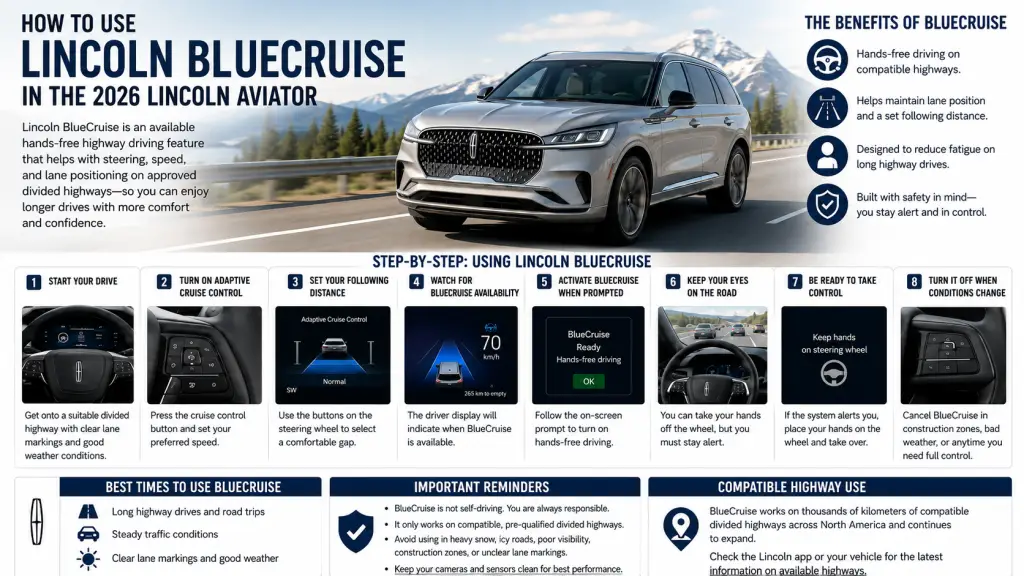
How to Use Lincoln BlueCruise in the 2026 Lincoln Aviator
Step 1: Start your drive normally.
Get onto a suitable highway and make sure road, weather, traffic, and lane markings are appropriate.
Step 2: Turn on adaptive cruise control.
Use the steering wheel controls to activate cruise control and set your preferred speed.
Step 3: Set your following distance.
Choose a comfortable gap between your Aviator and the vehicle ahead.
Step 4: Watch for BlueCruise availability.
The driver display will indicate when you are on a compatible hands-free highway section.
Step 5: Activate BlueCruise when prompted.
When the system is ready, follow the display instructions to allow hands-free operation.
Step 6: Keep your eyes on the road.
Even when your hands are off the wheel, you must stay alert and watch traffic, lane markings, weather, and road signs.
Step 7: Be ready to take control.
If the system alerts you, road conditions change, or hands-free mode ends, place your hands back on the wheel and drive manually.
Step 8: Turn it off when conditions are not right.
Cancel BlueCruise if you enter construction, snow, heavy rain, sharp curves, poor visibility, or an area where you feel manual control is safer.
Helpful Fort McMurray Driving Examples
If you are taking a longer highway drive out of Fort McMurray, BlueCruise can help support steady driving on compatible highway sections where conditions are clear.
If traffic is moving smoothly and lane markings are visible, the system can help reduce the small steering and speed adjustments that often happen during long trips.
If weather changes quickly with snow, fog, road spray, or icy conditions, it is better to turn the system off and drive manually. Northern Alberta roads can change fast, especially in winter.
What BlueCruise Does Not Replace
BlueCruise is a driver-assist feature, not an autonomous driving system. You are still responsible for the vehicle at all times.
The system does not replace safe judgment, proper following distance, winter tires, or attention to traffic. It also may not work when lane markings are covered, sensors are blocked, or the highway is not part of the hands-free network.
Think of BlueCruise as support for the right highway conditions, not something to use everywhere.
Tips for Using BlueCruise Comfortably
Try BlueCruise for the first time during a calm highway drive with clear weather and light traffic. This helps you understand how the Aviator responds before using it on longer trips.
Keep the windshield, cameras, and sensor areas clean. Snow, ice, dust, and road grime can affect driver-assist features.
Pay attention to the driver display. It will show when BlueCruise is available, active, paused, or asking you to take control.
Frequently Asked Questions
Does every 2026 Lincoln Aviator have BlueCruise?
No. BlueCruise may depend on trim, package, software, subscription status, and vehicle configuration.
Is BlueCruise self-driving?
No. BlueCruise is a hands-free driver-assist feature for approved highway sections. The driver must stay alert and ready to take over.
Can I use BlueCruise in Fort McMurray city traffic?
No. BlueCruise is intended for compatible divided highways, not city streets, parking lots, or local traffic areas.
Should I use BlueCruise in snow?
Avoid using it in heavy snow, icy conditions, poor visibility, or when lane markings are covered.
What happens if BlueCruise asks me to take control?
Put your hands on the wheel, stay calm, and resume manual control immediately.